On the e-File "Case Search" page, you may search by one of the following criteria:
- Case Identifier: Search by Case Number
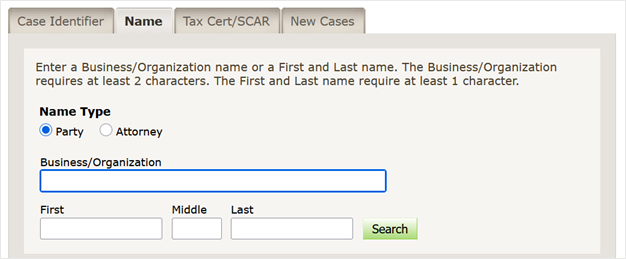
- Name: Search by Name Type (Business/Organization or First & Last Name)
- Tax Cert/SCAR: Search for Tax Cert or SCAR (Small Claims Assessment Review)
- New Cases: Search in one (1) specific court on one (1) specific date

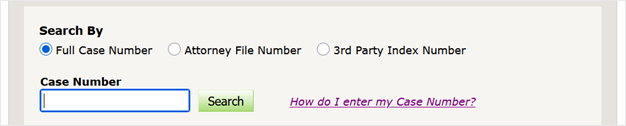
When searching by Case Number, you can search for Full Case Number (Index #, Docket #, etc.). You can also search by Attorney File Number or 3rd Party Index Number. The How do I enter my Case Number link provides information on the Index Number Format for each court and county.
Local Civil Court ONLY will allow you to search for civil court records in participating courts. (Civil (CV), Housing (LT) and 325d Transfers (TS).
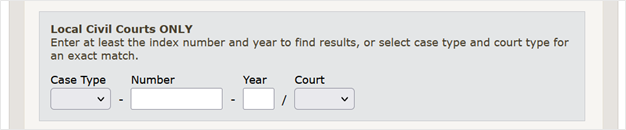
Case Number and Year Separated: If the format of a case is unknown, enter the case number and year separately (year is optional).

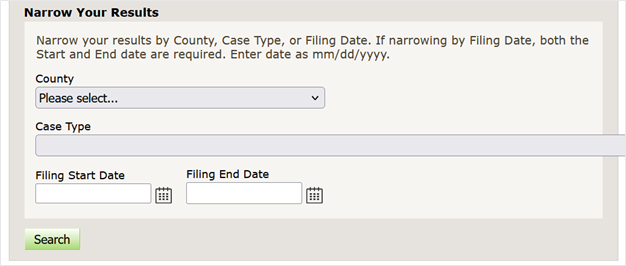
Narrow by Options: Search for specific county or Case Types. You can also search a specific range of dates.
Name Type: Search for party or attorney by Business/Organization or First and Last Name. Middle name is optional.
Tax Cert: Search by Block and Lot (required) for Tax Certiorari records.

SCAR (Small Claims Assessment Review): Search by Block and Lot (Required) for SCAR records.

New Cases: Search for newly commenced cases by Court and Filing Date.

No results for your inquiry will appear as above.
